

Inpost marketplace
InPost Von Halsky by Koda Plus: the InPost marketplace (InPost Von Halsky, also called InPost Buy) for Medusa on InPost seller API. Variants become marketplace offers with categories, parameters, photos and GPSR data, price and stock follow Medusa, market
InPost Von Halsky by Koda Plus
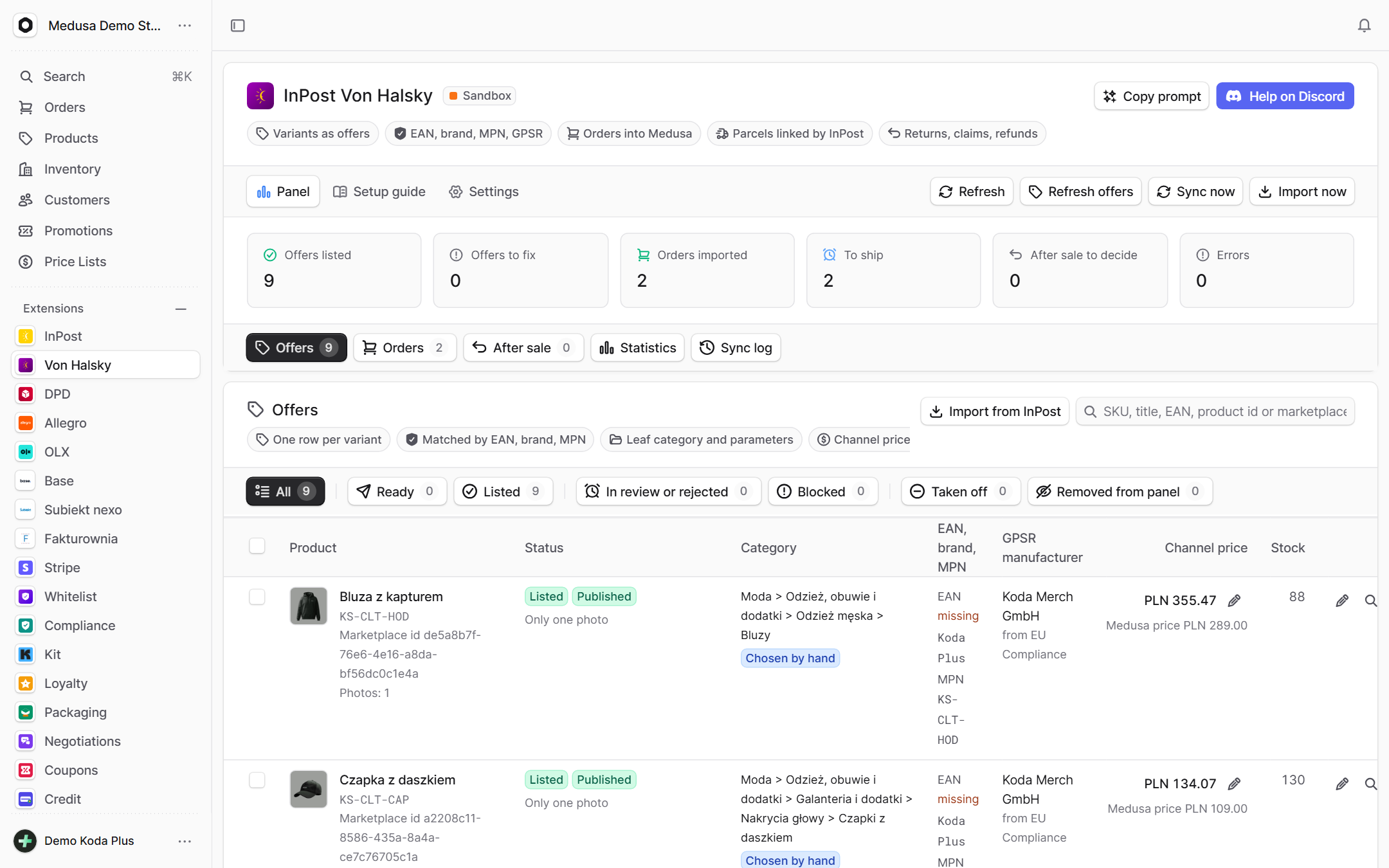
The InPost marketplace (InPost Von Halsky, also called InPost Marketplace or InPost Buy) for Medusa v2 stores in Poland, on InPost's seller API. Your variants become marketplace offers with the category, parameters, photos, GPSR data, price and stock the marketplace asks for; price and stock follow Medusa; marketplace orders come in as real Medusa orders, exactly once each; returns, claims and refunds are handled from the Medusa admin; and a statistics tab shows what the channel earns against your other sales channels.
What it does
- Offers: one row per Medusa variant with what the marketplace needs: the EAN (variant or , then metadata) or the brand with the manufacturer part number, the name, the description (HTML turned into text), up to 20 photos, the dimensions and weight (all four or none), the VAT rate, the GPSR manufacturer (from the EU Compliance plugin when it is installed, else from product metadata) and a marketplace leaf category with its required parameters. What is missing is shown per variant as the reasons it cannot be listed and the warnings that do not block it.
- Categories: the marketplace category tree is read weekly. A Medusa product category can be mapped to a marketplace leaf once for all its products; an offer can also take a category chosen by hand or the one the marketplace catalog suggests for its EAN (the catalog hint). The parameters of a leaf (dictionaries, numbers, texts) are edited per offer, the required ones block the listing until they are set.
- Listing: a person selects ready offers and lists them (batches of 500). The marketplace checks each offer: the panel shows PENDING, PUBLISHED, REJECTED with the validation messages, SOLDOUT or CLOSED, and every write the marketplace has not finished yet. Offers can be closed on InPost, reopened, put on a promotion price (with dates) or into the marketplace price program. Nothing is ever listed by itself.
- Editing an offer: "Edit offer" changes the name, the description, the photos (replace, remove, add, reorder: one https URL per line, the first is the main photo), the package (length, width, height in mm and the weight in g, all four) and the days to ship of one offer, over Medusa's values; an empty field follows Medusa again. Every value is checked against the marketplace's rules before it is kept (a name of 7 to 150 characters with two words, 100 characters of description, JPEG, PNG, GIF or WebP photos, the parcel limits, 0 to 60 days) and wins over Medusa in the checks, the offer sent and the list. An offer on the marketplace gets the change as a merge patch; a PUBLISHED one is closed first, patched and reopened by the sync one command at a time, as InPost's FAQ recommends for changes other than price and stock (if the patch is refused, the offer is reopened as it was and the row says why). Bulk: the days to ship of many offers, and the same category parameters on many offers of one category.
- Close on InPost or remove from the panel only: "Close on InPost" closes the offer on the marketplace and keeps it in the panel. "Remove from panel only" asks InPost nothing: the offer stays active on the marketplace, the plugin forgets its id and the sync never touches it again (no price, no stock, no status; its orders are held) until it is listed again or imported. Both ask before anything happens.
- Import from InPost: offers already on the marketplace (listed by hand, by another tool, or removed from the panel) are read page by page and linked to a variant by the external id (the variant id this plugin sends), then the SKU, the EAN and the manufacturer part number, only where exactly one variant matches. Linked offers take the marketplace's status, price and stock and the price and stock sync takes them over; offers that match nothing are listed after the import with their name, SKU and EAN, never created as products.
- Price and stock sync (on by default, a setting): every 5 minutes the listed offers whose Medusa price or stock moved get the new values in batches. At zero stock the offer is closed and it is reopened when stock comes back, as InPost's integration guidelines ask. The offers section and the settings say how often it runs and when it last did (InPost asks sellers to be told and recommends no more than 15 minutes between runs).
- Connection alert: when the marketplace refuses the credentials on two sync runs in a row (a refused token, a 401, a 403 with InPost's problem details; never the bare 403 of the gateway, which is asked again), the page shows a red banner with the time and the reason, Settings, Account says "Lost since", and the integration counter goes to 1. InPost deactivates the offers of a disconnected integration. The next run that reaches the marketplace, or a working "Check connection", clears it.
- Channel pricing: marketplace prices are gross. The channel price is the Medusa PLN price, with VAT added when Medusa keeps prices without tax, plus the markup in percent; a fixed price on one offer wins over both.
- Orders: new and changed orders are read from the marketplace's order events every 5 minutes. An order the marketplace has accepted (InPost accepts paid orders itself; one still CREATED and paid is accepted by the plugin) becomes a Medusa order in the chosen sales channel and PLN region, created as a draft, then placed (reservations, ) and paid with Medusa's system provider when the marketplace collected the money; an order not paid or not accepted yet waits, since the buyer's data come with the acceptance. An order cancelled or rejected on the marketplace after the import is flagged in the sync log so a person cancels the Medusa order. The order gets the buyer's InPost e-mail, the parcel locker or the courier on the shipping option you mapped, and the provider of that option validates the delivery as it would at checkout, so the InPost plugin ships it like a store order. One row per marketplace order id, written before anything else: a second import creates nothing, and a line that matches none of your offers holds the order with the reason (no product is ever invented).
- Shipping: the seller API takes no tracking number. A shipment made in ShipX with the order's InPost e-mail is linked by InPost itself. The plugin compares the tracking numbers of Medusa's fulfillments with the parcels the marketplace shows: linked, or waiting (with the hint to ship with the order's InPost e-mail).
- After sale: returns, claims and refunds are read every 5 minutes and kept per order. A person accepts a return (the marketplace refunds the buyer) or rejects it with one of the marketplace's reasons, answers a claim, refunds an order in part or in full, and retries a declined refund. The buyer's contact data are read live for the detail view and never stored.
- Statistics: revenue, orders and average order value of the marketplace against every other Medusa sales channel, daily revenue, offers by status, sell-through and listed offers without a sale, the most common validation errors, top products with their returns and claims, hours from payment to the first parcel and to the delivery date, late orders, the delivery, payment and buyer mix, what promotions and the price program gave away, return and claim rates and reasons, and a daily history of the offers. Views, click-through, ratings and payouts are not in the seller API: the tab says so instead of estimating them.
- The admin page (): counters, offers, orders, after sale, statistics, the sync log, a setup guide with live step states and the settings (markup, sales channel and region, shipping mapping, category mapping, offer defaults, automatic import, the account with a connection check and "Sync now"). An order widget shows the marketplace origin of an order.
- Works with Koda Plus hosts through the contract: the manifest, an order and a product summary, and five board counters.
Requirements
- Medusa 2.12 or newer (peer range ) and Node.js 20+.
- For sandbox and live: a seller account on InPost Von Halsky and an API application created in the Merchant Portal (Integrations, API, "Create App", with the seller API scopes). It gives the client id and the client secret; the organization id is in the portal settings. Sandbox (stage) and production applications are separate. Demo mode needs none of it.
- A region in PLN and shipping options for parcel lockers and the courier.
Installation
Three migrations: adds , , and ; adds the columns of the seller API to the first two and the tables (returns, claims, refunds), (the category tree) and (the daily offer counts); adds the column (the edits of single offers) to .
Configuration
Missing options never break the boot: without credentials and without the plugin says "Not configured" and every route answers politely.
Options
- (default false): demo mode, only on explicit request; it wins over the credentials.
- (default ): which credentials are used. Sandbox credentials never serve live.
- , : . The plugin signs in as the API application (OAuth2 client credentials) and takes a fresh access token whenever the last one runs out. and default to InPost's stage gateway for sandbox and the production one for live (https only).
- (default 0, -50 to 300): the channel markup. The admin setting wins.
- (default 23): the VAT added to net Medusa prices and sent with the offer; (default ): a metadata key for a product's own rate.
- (default: read from the PLN price preference): whether Medusa's PLN prices include tax.
- , : where imported orders land. Default: a sales channel named "InPost Von Halsky", else the store default; the first PLN region. The admin settings win.
- (default false): import new orders on the 5 minute sync. The admin setting wins.
- (default true): the writer of price and stock of listed offers. The admin setting wins.
- (default 2, 0 to 60): the days to ship sent with offers. The admin setting wins.
- ( or , default ), ( or , default ): the units of Medusa's dimensions and weight; the marketplace takes millimetres and grams.
- (default ), (default ), (default ): the metadata keys read on the variant, then the product.
- (default every location): the locations whose stock counts.
- (default 0): the quantity offered for variants whose inventory Medusa does not manage.
- (default 15000): the timeout of one request to the seller API.
Setup in brief
- Create the API application in the Merchant Portal (stage first) and set the three values above.
- Install, configure and migrate, then press Check connection in Settings, Account.
- Prepare the catalog: EAN (or brand and part number), name, description, photos, PLN price, published products; the GPSR manufacturer (name and e-mail) in the EU Compliance plugin or in product metadata (, or , , ), or for a product that needs none.
- Settings: the markup, the sales channel and region of orders, the shipping options of parcel lockers and the courier, the category mapping (Medusa category to marketplace leaf), the offer defaults (days to ship, return and complaint policy).
- Refresh offers, fill the parameters the categories require, list the first ones and watch them go from PENDING to PUBLISHED.
- Switch on automatic import, ship the first order in ShipX with the order's InPost e-mail.
The setup guide in the admin shows each step with its live state.
Demo mode
Only on explicit request (). A simulated marketplace runs inside the server, and nothing is ever sent outside, even with credentials set:
- the mode badge says Demo (simulation);
- the category tree is a small sample (four top categories with leaves and parameters), the catalog hint answers for any EAN;
- List selected sends ready offers to the simulated marketplace: they are PENDING until the next sync reads the command, then PUBLISHED (or still PENDING with the validation messages when photos, the description or a leaf category are missing); price, stock, promotions and the price program work the same way;
- Simulate an order builds a sample marketplace order from the published offers (a sample buyer at example.com, a sample parcel locker , paid with BLIK, card or a payment link, every fifth one with a company invoice) and imports it through the same path as a real one: a real Medusa order in the "InPost Von Halsky (demo)" sales channel, with , placed (it reserves stock) and paid; the simulated stock goes down and an offer sells out at zero;
- Ship (simulation) fulfils and ships an imported demo order in Medusa with a sample tracking number (24 digits starting with 99, never a real parcel), and the simulated marketplace links the parcel as InPost would;
- Simulate a return and Simulate a claim open a case on a simulated order, read in by the sync like a real one; accepting a return or refunding an order produces the refund events;
- the statistics fill from these rows.
Simulated orders are real orders of your store: cancel them in Orders when you are done. The simulated marketplace forgets its offers and orders when the server restarts; the plugin's own rows stay.
The sync
A scheduled job (, every 5 minutes) and the admin's Sync now run the same parts, each on its own so one failing never stops the others: the commands the marketplace has not finished, offer events (and offers not read for a day), price and stock, order events and changed orders, returns, claims and refunds, the category tree (weekly) and the daily snapshot. A run in progress is joined, never doubled. Each failure goes to the sync log with the secret masked.
The client keeps to the seller API limits: pages of 30, batches of 500 offers, 100 price or stock changes and 200 campaign declarations, a wait for the server's on 429, retries of reads on network errors and 5xx, one token refresh on 401. The last rate limit seen is shown in Settings, Account.
Admin API
Every route needs an admin session or token. Writes take a JSON body or the header.
- : the page in one read: the mode, the missing and ignored options, the options in use (client id and secret masked), the settings, where orders land, the store's sales channels, PLN regions and shipping options, whether EU Compliance is installed, the counters, the last rate limit, the category tree size, (the alert above) and .
- : signs in and reads the organization and one offer; a working check clears the connection alert.
- : the sync now; answers what each part did.
- : the statistics.
- : the offers (: , , , , , ; : a SKU, title, EAN, product, variant or offer id), each with its edits (, ), Medusa's values of those fields () and what the marketplace gets ().
- : reads the catalog again (lists nothing).
- , , : list (a closed offer listed again is reopened on the marketplace), close on InPost, back to draft.
- : remove from the panel only; InPost is not called, the offers stay active there and the sync no longer touches them.
- : links the offers already on the marketplace to variants (external id, SKU, EAN, part number); answers .
- : (mm, g; null goes back to Medusa); 400 with the field's code when a rule is broken, 409 while the last change of the offer is pending; answers the offer and : , or (closed now, patched and reopened by the sync).
- : the days to ship of many offers (0 to 60, null for the offer defaults).
- : the same category parameters on many offers of one category (a parameter without values is removed); offers on the marketplace get them at once.
- : a fixed gross price ("129.99"), or null for the markup.
- : the catalog hint for the offer's EAN or part number.
- : a leaf chosen by hand, or null.
- : the category parameters of one offer; an offer on the marketplace gets them at once, the way an edit goes.
- : (mode , or , ISO dates), or null to end it.
- : or of the price program.
- , , , : the tree, a fresh read, the Medusa categories with their mapping, the parameters of a leaf.
- : the marketplace orders (: , , , ).
- : read and import now, also with automatic import off.
- : a held import again (never a second order).
- : read the order again and compare the parcels.
- : a refund through the marketplace (the whole order without an amount).
- : returns, claims and refunds (: , , , ).
- : one case read live, with the buyer contact and the reject reasons.
- , , , : the decisions.
- , , : demo mode only.
- : the marketplace origin of a Medusa order (the widget).
- , : , , , , .
- : the sync log (30 days).
The plugin has no store routes.
In the sidebar
InPost Von Halsky has its own sidebar entry, "Von Halsky" at , with rank 3, so it sits next to the InPost entry of the InPost plugin when both are installed. A marketplace is a sales channel of its own, not a way to ship, so it is not a tab of the InPost page (it was, up to 0.1.0 in the monorepo). Links with parameters open the page on that list, for example .
Works with Koda Plus hosts
- : the manifest (mode , , or , entities and , the widget in , the offer writer).
- : one line per imported order: to ship (blue), shipped and linked by InPost (green), shipped but not shown by the marketplace yet (orange); facts: the channel (code ) with the marketplace order id, the payment (code or ), the parcel locker or courier, the tracking numbers, returns and claims.
- : listed (green), ready (blue) or blocked with the first reason (orange).
- : (red), and (orange), (blue), (orange), linked to the filters of the page, and (red, scope , 1 while the marketplace refuses the credentials), linked to Settings, Account.
Security and data
- The client secret is never shown in full (the admin sees and the last four characters of the client id and the secret) and is masked in logs and stored errors, as are bearer values. Access tokens live in memory only.
- Writes need the admin: writes under take a JSON body or the header. A shopper may not set metadata, or on carts or the account: the plugin never trusts order metadata, its own tables are the record.
- What the plugin keeps: per offer the variant and product ids, SKU, title, EAN, brand, MPN, the category and parameters, the manufacturer name, the reasons, prices, stock and what the marketplace says about the offer; per marketplace order the ids, the delivery type and parcel locker, the payment type, the money facts (total, delivery, discounts, refunded), the lines (offer, variant, SKU, title, quantity, price), the parcels, dates, whether the invoice is for a company, the tracking numbers and a short history; per case the ids, status, reason, amount, lines and dates. No buyer name, address, e-mail or phone is stored in the plugin's tables: they go only on the Medusa order, and the after sale detail reads them live. The sync log keeps ids, never personal data, and prunes itself after 30 days.
- Writers: nothing is listed or decided by itself. Listing, edits, closing, imports, promotions, return and claim decisions and refunds are a person's action; price and stock sync is on by default and can be switched off; automatic import is off by default.
Branding
This plugin is an independent integration. It contains no imitation of InPost's or Von Halsky's seller panel. The admin icon shows InPost's crescent on Von Halsky's violet only to identify the marketplace, and the demo texts say "demo" and "simulation".
Uninstall
- Remove the plugin from and the package from .
- The seven tables stay with their data. Drop them by hand when you no longer need them, or run before removing the package. Imported orders stay in Medusa; the demo sales channel can be deleted in Settings. Delete the API application in the Merchant Portal.
Compatibility
Medusa 2.12 or newer (peer range ) and Node.js 20+. The tests and the build run on Medusa 2.15.3. The seller API client follows InPost's OpenAPI 1.7.6. The admin libraries (, , , , , ) are optional peers: the plugin uses the copies of Medusa's dashboard. Developing the plugin needs Node.js 22.6+ (the tests run the TypeScript sources directly).
Public API
What other code may import: (offers: , , , , , , , , , , , , , , , ; orders: , , , , , , , , ; after sale: , , , , , , ; , , , the types), (the module, its options, the client interface and the response types) and . Every other path is internal and may change in any release.
Development
Commercial support
Built and maintained by Koda Plus, a Medusa agency from Poland. Want your store on the InPost marketplace? Write to kontakt@koda.plus.
Trademarks
InPost, InPost Von Halsky, InPost Buy, Paczkomat, ShipX and Medusa are trademarks of their owners, used here only to identify the marketplace this plugin connects to and the platform it runs on. This is an independent integration, not affiliated with or endorsed by InPost or Medusa.
License
MIT, see LICENSE.
Changelog
Every release is in CHANGELOG.md.
- 0.1.0 (unreleased): the first version, on InPost's seller API. Offers with categories, parameters, photos and GPSR, price and stock sync, promotions and the price program, order import from order events, ShipX linking, returns, claims and refunds, statistics, the admin page and the order widget, demo mode with a simulated marketplace, the koda.integration/1 contract, one InPost menu with the InPost plugin. It needs .